10/2/2026, 11:33:25 PM
How to Prepare Your Store App for Android and iOS Review
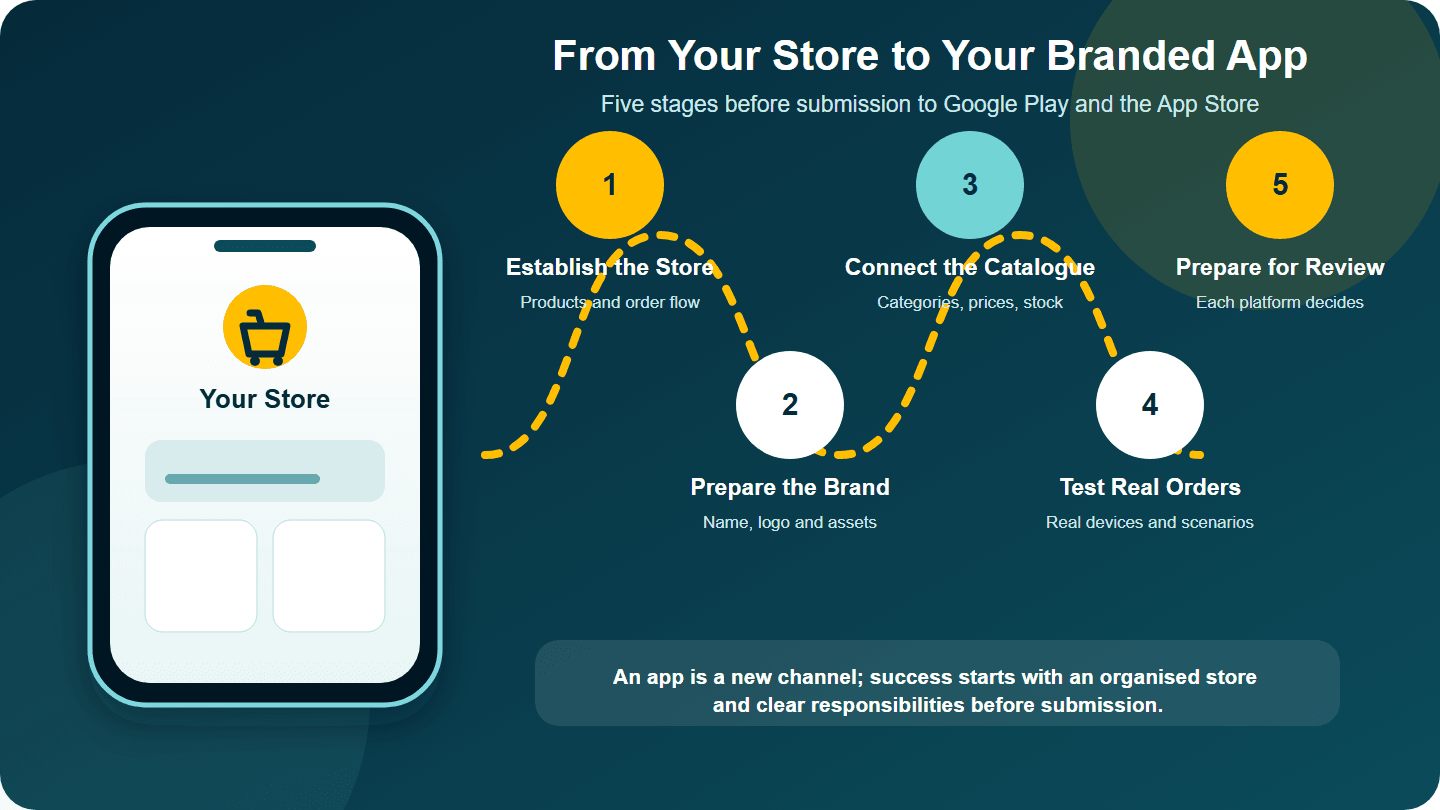
A practical guide for Syrian merchants on preparing a branded store app for review, from delivery and payment settings to catalogue testing and developer-account responsibilities.
A store app is not simply a smaller version of a website, and it is not the place to start before your day-to-day operation is stable. It is an additional channel that carries your store's name and identity. It needs an organised catalogue, a clear ordering experience, complete store-listing materials, and careful testing and review before customers can use it.
This guide explains what a merchant needs to prepare before an app build is ready to submit for review, what to test, and where the app stores' responsibilities begin. It does not promise approval or cover every follow-up request either platform may make after submission. If you are still deciding between a website and an app, begin with Should Your Store Have an App or Just a Website?.
In short: an app becomes a sensible next step when your store, products and order operation are ready—and when you know why customers would return after installing it.
Is your store ready for an app?
An app may make sense now when
- Your store has a clear name and identity.
- Your catalogue has organised categories, current images, prices and descriptions.
- Your team has tested the journey from choosing a product to confirming an order.
- Your team knows who maintains products, orders and customer service.
- Customers have a clear reason to return, such as regularly updated products, offers or repeat purchases.
Start with the website first when
- You are still testing your products or business model.
- Prices and stock change without a dependable update process.
- Orders arrive from several channels without one way to track them.
- You have not yet tested the buying experience on a phone.
An app does not automatically fix an untidy operation. If orders and stock are the first problem to solve, review How to Manage Orders and Inventory in Your Online Store before moving to an app.
What should you prepare before app work begins?
Scroll horizontally to read every column.
| File | What to prepare | Why it matters |
|---|---|---|
| Store identity | Approved name, logo, colours and image style | Keeps the brand consistent inside the app and on its store listing |
| Catalogue | Categories, images, descriptions, prices and quantities | Lets customers test a real purchase journey instead of an empty demonstration |
| Service information | Contact details, service areas, and order or return policies where applicable | Makes customer-facing information clear and reviewable |
| Store-listing materials | A concise description, screenshots, icon and contact details | Google Play and the App Store require information and assets for the listing |
| Test plan | Devices, use cases and people responsible for review | Helps uncover display and ordering problems before public release |
Do not assume that one file works for both platforms, or that acceptance on one guarantees acceptance on the other. Each platform has its own setup and review process.
What should a Syrian merchant decide before app settings are finalised?
Before approving a test build, turn the way your store operates on the ground into written settings for the store and app:
- Define the delivery areas you can serve reliably. List the cities or areas you cover, how delivery charges are calculated, and which cases need manual confirmation. Do not show an area that your team or delivery company cannot serve consistently.
- Enable only the payment methods available to your business. Tajerly's current pages describe configuration for cash on delivery, electronic payments and delivery-company connections within the chosen plan and agreed setup. They do not establish that any particular provider is available to every merchant or region. Test every method customers will see and document what happens when an order succeeds or cannot be completed.
- Document ownership and operation of the developer accounts. Record who creates the Google Play and Apple accounts, who keeps access and renews any applicable fees, and who uploads builds and answers review feedback. Do not assume that an account will belong to the merchant or Tajerly unless the agreement says so.
These are not side issues. They determine what customers see when they enter an address, choose payment and ask for support after installing the app.
Five stages from online store to review-ready app
Stabilise the store experience before moving it into the app
Start with products you genuinely sell, not a temporary catalogue. Review categories, images, prices, availability, cart steps, customer details and order confirmation. Your team should test a coherent journey that can be carried into the app rather than start organising the store after the app has been built.
Prepare the identity and content package
Agree on the customer-facing name, logo and colours, then prepare an accurate description and genuine screenshots. Do not use images or promises that are absent from the app. Google Play guidance explains that a store listing needs a name, description, contact details and presentation assets. Apple requires the necessary metadata to be complete and a build to be selected before submission for review.
Connect the catalogue and test ordering
According to Tajerly's current pages, an eligible plan can include a customer app for Android and iOS carrying the store's name and colours and displaying only that store's products, with management connected to the Tajerly platform. Review Tajerly's branded store app and the current plans to confirm the included scope before agreeing to proceed.
At a minimum, test:
- Opening categories and reaching a product.
- The clarity of images, price and availability.
- Adding a product to the cart and changing the quantity.
- Entering customer details and completing an order.
- The order appearing in the way agreed with the store team.
Test on real devices and in realistic conditions
Working on one device is not enough. Test different screen sizes, a slow connection, long Arabic text, an unavailable product and a basket containing several products. Record every issue with the device, step and expected result instead of sending a broad note such as “the page does not work.”
Google Play provides pre-production testing tracks and may impose specific testing requirements on some newer personal developer accounts. Apple reviews every submitted build and may ask for corrected information or an issue to be addressed before acceptance. Treat review as a separate stage, not as a guaranteed publication date.
Document responsibilities and prepare the submission package
Before submission, agree in writing who is responsible for the developer accounts, uploading the build, store-listing materials, and responding to review feedback. These duties can vary by plan and agreement, so do not assume a particular party handles them unless it is documented. Put the tested build, description, screenshots, contact information and acceptance-test results into one package for the person responsible for submission.
This guide ends when the build is ready for review. Google Play or the App Store may request further information or changes after submission, and completing this checklist does not guarantee approval.
Who is responsible for each part?
Scroll horizontally to read every column.
| Merchant | Tajerly, subject to the plan and agreement | Google Play and the App Store |
|---|---|---|
| Approves the name, identity and business information | Prepares the app experience and connects it to the store within the agreed scope | Defines account, listing and review requirements |
| Supplies product images, descriptions and prices | Applies the identity and features included in the plan | Reviews the submitted build and information |
| Reviews content and completes a clear acceptance test | Addresses technical feedback within the agreed scope | Accepts the build or requests changes under its policies |
| Operates orders and customer service after launch | Provides support and updates under the agreement | Manages publication status and availability on the platform |
This table describes general boundaries; it does not replace the service proposal or written agreement.
Checklist before requesting publication
- The name, logo and colours are approved.
- Product images, descriptions and prices are current.
- Categories and availability are clear.
- Contact details and applicable policies are complete.
- The app description and screenshots match the actual build.
- The order journey has been tested on Android and iOS within the agreed scope.
- Developer-account and publication responsibilities are documented.
- Critical issues have been resolved before submission.
- Someone is responsible for operation and support after launch.
A branded app or a place in a multi-merchant marketplace?
This guide assumes that you want an app carrying your store's name and showing your own products. If you are still comparing that model with selling in an app containing several stores, read A Branded Store App or a Multi-Merchant Marketplace?.
Next step
First review the branded ecommerce app, then compare the current plans. Ask for written clarification of what app preparation includes, who owns the developer accounts, and who handles the listing materials, submission and later review feedback.
Frequently asked questions
Do I need an online store before the app?
An app needs products, categories, an ordering experience and a clear daily operation. If those are not stable yet, beginning with a responsive store and testing the operation is the more sensible step.
Does the Tajerly app show products from other stores?
According to Tajerly's current pages, the app available with an eligible plan is branded for that store and displays only its products; it is not a multi-vendor marketplace.
Is publication on Google Play and the App Store immediate?
No. Publication requires complete information and assets, a tested build, and each platform's review process. A customer should not be promised an acceptance date before the requirements and review are complete.
Who owns the developer accounts and handles submission?
Tajerly's current public pages do not assign this responsibility to one party in every case. It should be documented in the service proposal or agreement before work begins.